Every great website starts with an idea.
Sometimes, a client comes to me with a clear vision of what they want. Other times, they have a business idea, a few design references, and a general feeling of how their website should look.
But turning that initial idea into a professional, fully functional WordPress website takes more than choosing a theme and arranging a few sections.
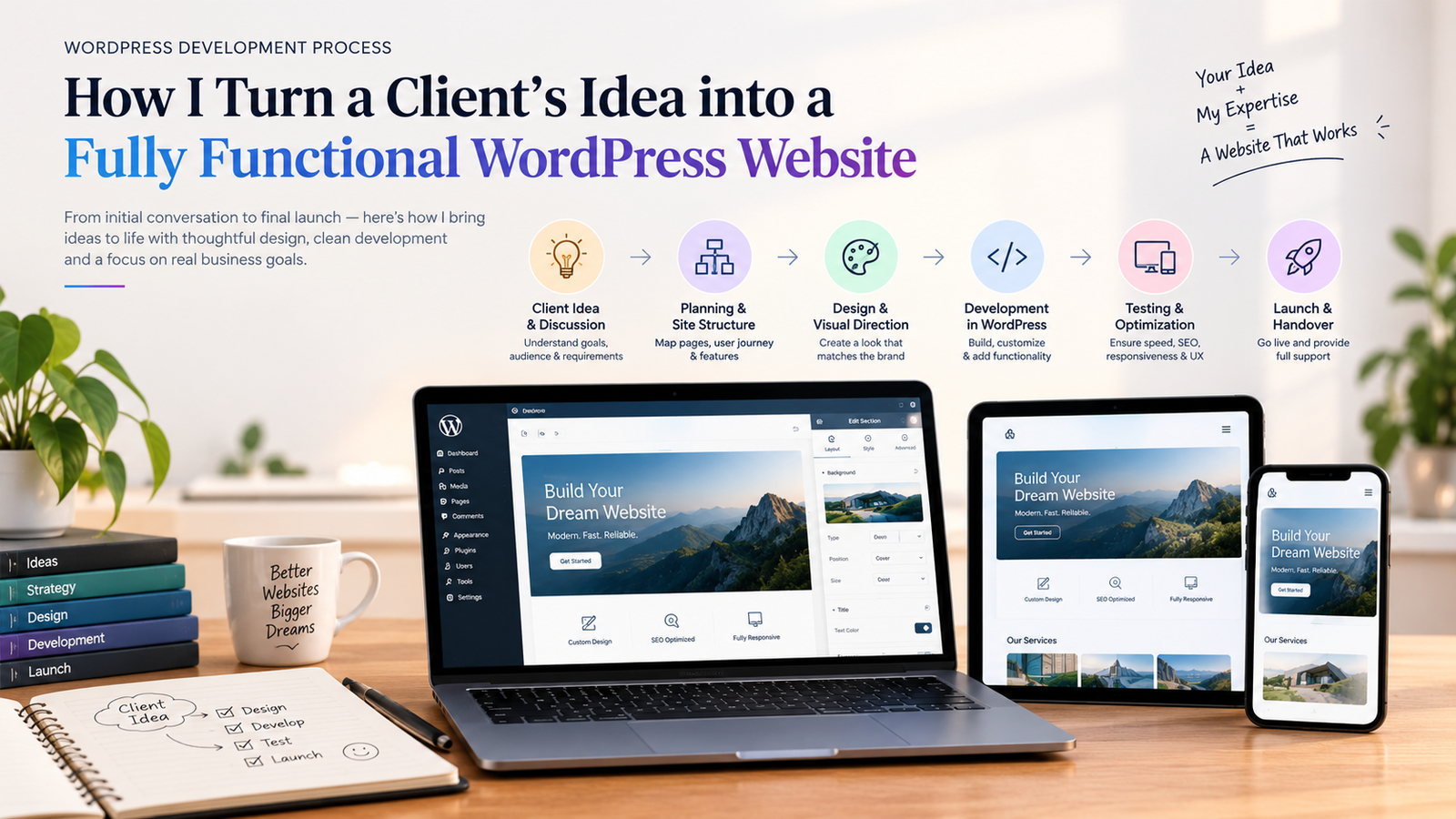
It requires understanding the client’s goals, planning the user experience, creating a thoughtful design, developing the website, and making sure everything works smoothly across different devices.
As a WordPress developer and website designer, my goal is to turn a client’s vision into a website that not only looks professional but also serves a real purpose.
In this article, I’ll walk you through my website development process, from the first conversation with a client to the final launch.
1. Understanding the Client’s Vision and Business Goals
Before I start designing anything, I focus on understanding the client.
A website shouldn’t be built simply because a business needs an online presence. It should be designed around what the business wants to achieve.
For some clients, the goal might be to generate leads. Others may want to showcase their portfolio, sell products, promote their services, or build trust with potential customers.
Understanding these goals helps me make better decisions throughout the project.
During the initial discussion, I try to understand:
- What does the business do?
- Who is the target audience?
- What is the primary purpose of the website?
- Which pages and features are required?
- Are there any existing websites or design references the client likes?
- What problems should the new website solve?
- What is the expected timeline and budget?
I also discuss the client’s brand identity, including colors, typography, preferred design style, and any existing brand assets.
These conversations help turn a broad idea into a clearer project direction.
My approach: I don’t begin with the question, “Which theme should we use?” I begin with, “What should this website accomplish?”
That difference helps ensure the final website is built around the client’s needs rather than the limitations of a particular design or tool.
2. Planning the Website Structure and User Journey
Once I understand the client’s goals, the next step is planning the website structure.
This stage is important because even a visually attractive website can become confusing if visitors don’t know where to go or how to find the information they need.
I identify the essential pages and organize them into a logical structure.
For example, a typical service-based business website might include:
- Home
- About
- Services
- Portfolio or Projects
- Blog
- Contact
Depending on the business, it might also need pricing pages, testimonials, FAQs, booking functionality, or dedicated landing pages.
After identifying the pages, I think about the visitor’s journey.
What should someone see when they first land on the homepage? What information will help them trust the business? Where should the primary call to action appear? How can they contact the business without unnecessary steps?
These questions influence the layout and content hierarchy.
For example, if the main goal is generating leads, the homepage should clearly communicate the service, explain its value, establish credibility, and make it easy for visitors to get in touch.
At this stage, I also consider mobile users, accessibility, navigation, and the overall ease of use.
A well-planned website structure creates a strong foundation for both design and development.
3. Creating a Visual Direction That Matches the Brand
With the website structure in place, I move on to the visual direction.
This is where the client’s idea begins to take shape visually.
My goal is to create a design that reflects the brand’s personality while providing a clear and comfortable experience for visitors.
I consider several important elements:
Typography: I choose fonts that match the brand’s personality and make the content easy to read.
Color palette: I establish a consistent set of colors for headings, backgrounds, buttons, and other interface elements.
Spacing and layout: I use appropriate spacing, alignment, and visual hierarchy to create a clean and balanced design.
Imagery: I identify the types of images, illustrations, or project visuals that will support the content.
User interface elements: I plan buttons, cards, navigation menus, forms, and other components so they feel consistent throughout the website.
When appropriate, I use wireframes or visual mockups to establish the layout before moving into development.
I also review the client’s references to understand what they like about them, rather than copying another website without considering the client’s specific needs.
A good design isn’t just about making a website look modern. It’s about creating a visual system that communicates the right message and helps visitors take the next step.
4. Turning the Design into a WordPress Website
Once the structure and visual direction are clear, I move into WordPress development.
This is where the design starts becoming a real, interactive website.
I first choose an appropriate development approach based on the project’s requirements. Depending on the design, functionality, and maintenance needs, this might involve a suitable WordPress theme, the block editor, a page builder such as Elementor, or custom development.
I then build the website’s main sections and components.
These may include:
- Header and navigation
- Hero section
- Service and feature sections
- About and testimonial sections
- Portfolio or project galleries
- Calls to action
- Contact forms
- Footer and supporting navigation
Throughout development, I focus on maintaining consistency between the original design and the actual website.
I also make sure that the components are practical to maintain. For example, if a client needs to update text, replace images, or publish new blog posts regularly, the website should make those tasks manageable.
My priority is to build a website that works for the client long after the project is complete—not just one that looks good in a screenshot.
5. Making the Website Responsive Across All Devices
A website isn’t complete just because it looks good on a desktop screen.
People visit websites using smartphones, tablets, laptops, and monitors of different sizes. The experience should remain clear and functional across these devices.
During development, I adapt the layout to different screen sizes rather than simply shrinking the desktop design.
This may involve adjusting:
- Font sizes and line spacing
- Section padding and margins
- Navigation menus
- Image sizes and cropping
- Column layouts and card arrangements
- Button sizes and spacing
- Forms and other interactive elements
For example, a three-column service section on desktop may work better as a single-column layout on a smaller mobile screen.
I also check that important buttons are easy to tap, text remains readable, and visitors don’t have to scroll horizontally to view content.
Responsive design isn’t an extra feature added at the end. It is an essential part of creating a website that people can use comfortably.
6. Adding the Right Functionality and Integrations
A professional website needs more than a good layout. It also needs the right functionality.
The features I implement depend on the client’s business goals and project requirements.
For one project, this might mean creating a contact form and connecting email notifications. For another, it could involve setting up a blog, integrating analytics, creating an online store, or adding a booking system.
Depending on the project, functionality may include:
- Contact forms and lead generation
- Blog and content management
- Search engine optimization essentials
- Social media links and integrations
- Analytics and tracking
- E-commerce functionality through WooCommerce
- Appointment booking or inquiry systems
- Security, backups, and spam protection
I avoid adding plugins simply because they seem useful. Every plugin introduces another dependency, so I evaluate whether a feature is actually needed and whether the chosen solution fits the project.
I also consider performance, compatibility, security, and future maintenance.
The goal is to create a website that supports the client’s workflow without making it unnecessarily complicated.
7. Optimizing Performance, SEO, and User Experience
Before launching a website, I review the technical and usability details that can affect its overall quality.
A website may look excellent, but if it loads slowly, has broken links, or makes important information difficult to find, the experience is incomplete.
I focus on several areas during this stage.
Website performance
I optimize images, review unnecessary scripts and plugins, and configure appropriate caching and other performance improvements.
I also test important pages to identify issues that could slow down the website.
Basic on-page SEO
I make sure the website has a logical heading structure, descriptive page titles, useful meta descriptions, readable URLs, and relevant internal links.
I also check image alternative text where appropriate and ensure that important pages can be discovered by search engines.
These steps establish a foundation for SEO, although rankings depend on many additional factors, including competition, content quality, and site authority.
User experience
I review the website from a visitor’s perspective.
Is the main message clear? Are the navigation links easy to understand? Can visitors find the services quickly? Are the calls to action visible? Does the contact form work as expected?
I also pay attention to accessibility, including keyboard navigation, readable text, and sufficient color contrast.
A successful website should feel effortless to use, even when a lot of planning and development went into creating it.
8. Testing Every Important Detail Before Launch
Before making a website live, I test it carefully.
This is one of the most important stages of my process because small issues can affect the visitor experience and the client’s professional image.
My pre-launch review includes:
- Checking the main pages on desktop and mobile
- Testing navigation menus and internal links
- Submitting contact forms and checking notifications
- Verifying buttons and calls to action
- Reviewing images, headings, and page content
- Checking responsive layouts at different screen sizes
- Looking for broken links and layout issues
- Testing important functionality and integrations
- Reviewing performance and basic SEO settings
- Confirming that backups and appropriate security measures are in place
Where possible, I test changes in a staging environment before applying them to the live website.
I also review the website with the client, collect feedback, and make the agreed adjustments.
The purpose of this stage isn’t just to find technical errors. It’s to make sure the final result matches the original requirements and is ready for real visitors.
9. Launching the Website and Handing It Over to the Client
After the website passes the necessary checks and the client approves the final version, it’s time to launch.
Depending on the project, this may involve configuring the domain, hosting, SSL certificate, redirects, backups, analytics, and other production settings.
I then perform a final review of the live website to confirm that the important pages, links, forms, and features are working correctly.
But my process doesn’t stop at launch.
A client should know how to manage their website without needing a developer for every small update.
Where required, I provide guidance on tasks such as:
- Updating text and images
- Publishing blog posts
- Managing website content
- Updating WordPress, themes, and plugins safely
- Maintaining backups
- Understanding ongoing maintenance requirements
For more complex websites, I may also recommend a maintenance plan that covers updates, backups, security checks, and troubleshooting.
A successful handover gives the client confidence in using their new website and helps them understand how to maintain it over time.
What Makes My WordPress Development Process Different?
For me, building a website isn’t just a technical task. It’s about bringing together design, functionality, usability, and the client’s business goals.
I aim to keep the process organized and transparent, from understanding the initial idea to reviewing the finished website.
Here are the principles I focus on:
Purpose before appearance: Every design decision should support a clear goal.
Design with the user in mind: The website should be easy to navigate, understand, and use.
Functionality without unnecessary complexity: Features should solve real problems rather than make the website harder to maintain.
Consistency across devices: The experience should remain professional on mobile, tablet, and desktop.
Quality beyond launch day: Performance, security, maintainability, and content management are important parts of the finished product.
Every project is different, so I adapt my approach to the client’s requirements rather than forcing every website into the same process.
Final Thoughts
Turning a client’s idea into a fully functional WordPress website involves much more than writing code or designing a homepage.
It starts with understanding the business, planning the structure, defining the visual direction, and developing a website that brings everything together.
From responsive design and useful functionality to performance optimization and final testing, every stage contributes to the finished experience.
My goal is to create websites that look professional, work reliably, and help businesses communicate their value online.
Because at the end of the day, a great website isn’t just a reflection of an idea—it’s a practical tool that helps turn that idea into something real.